JavaScript/개념정리
JavaScript 02 < 입력 이벤트 >
Itchild
2024. 4. 22. 22:34
728x90
반응형
<!DOCTYPE html>
<html>
<head>
<meta charset="UTF-8">
<title>키보드 입력 이벤트</title>
<!--  테두리를 만들어 주자  -->
<style type="text/css">

	input{ -- input에 들어가는 테두리
		border: 5px solid black;
	}

</style>
</head>
<body>
   -- 연결할수 있다. 함수 이름을 test 라고 할 것이고 발생할 인자를 event라고 할 것 이다.
<input type="text"  onkeydown="test(event)" placeholder="keydown 이벤트"> //이벤트 타겟이 얘다.
                   -- 키를 눌렀을 때
<script>
	function test(event){
		console.log(event.keyCode); // 사용자가 누르는 모든 값에는 key Code가 있다.
		if(event.keyCode == 13){ // keyCode(엔터) 라는 의미 enter
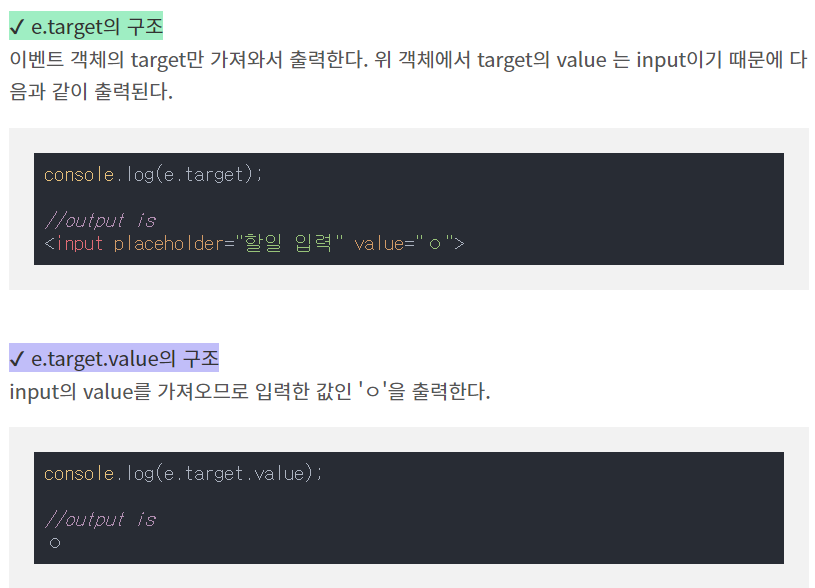
			console.log(event.target); // 쓰레드 원리--> 얘가 한발짝 느리다
             // 이벤트에 타겟이 되는 값을 보여줘
			alert(event.target.value); // 얘가 바로 찍힌다. 컴퓨터에 바로 찍힌다.
             // 그래서 얘가 먼저 나옴
		}
	}


</script>
</body>
</html>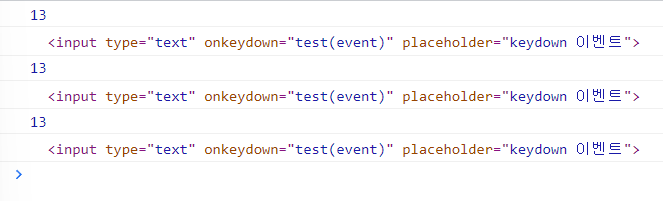
<!DOCTYPE html>
<html>
<head>
<meta charset="UTF-8">
<title>마우스 입력 이벤트</title>
<!-- 기본색도 지정해주기  -->
<style type="text/css">
   #box { -- 박스 크기를 만들어주자
      width: 50px;
      height: 50px;
      background-color: lightgray; 배경색은 lightgray
      cursor: pointer; 마우스 포인터
   }
</style>
</head>
<body>

마우스를 갖다대면 test1
마우스 나가면 test3
마우스를 클릭하면 test2

<div id="box" onmouseover="test1(this)" onmousedown="test2(this)" onmouseout="test3(this)"></div>
           마우스를 갖다댔을때          마우스를 눌렀을때           마우스가 벗어났을때
<script type="text/javascript">
   function test1(obj){ 마우스를 갖다댔을때 이 색깔로 바꿔줘
      obj.style.backgroundColor = 'lightgreen';
   }

   function test2(obj){ 마우스를 눌렀을때
      obj.style.backgroundColor = 'lightpink';
   }

   function test3(obj){ 마우스가 벗어났을때
      obj.style.backgroundColor = 'lightblue';
   }
</script>

</body>
</html><!DOCTYPE html>
<html>
<head>
<meta charset="UTF-8">
<title>Insert title here</title>
</head>
<body>
-- 누를수 있는 버튼 타입을 만들어 준다. 눌렀을때 test() 실행
<button type="button" onclick="test()">id속성값이 check인 목록에 변화주기</button>
<br><br> -- 누를 수 있는 버튼 타입. 눌렀을때 test2() 실행
<button type="button" onclick="test2()">class속성값이 check2인 목록에 변화주기</button>
<ul>
<li class="check2">1번째 목록</li> -- 'check2' 라는 클래스는 test2() 를 수행
<li id="check">2번째 목록</li> --'check'라는 아이디는 test()을 수행
<li class="check2">3번째 목록</li>
<li>4번째 목록</li>
<li class="check2">5번째 목록</li>
</ul>
<script type="text/javascript">
function test(){
var obj=document.getElementById('check'); -- 체크라는 아이디 불러오면
obj.style.backgroundColor='blue'; -- 그 배경색을 파랑으로 할거야
}
function test2(){
var arr=document.getElementsByClassName('check2'); -- check2라는 클래스 들 불러오면
for(var i=0;i<arr.length;i++){ //for문으로 모든 class 들 찾기
arr[i].style.backgroundColor='gray'; -- 클래스들 모두 회색으로 바꿔줘
}
}
</script>
</body>
</html>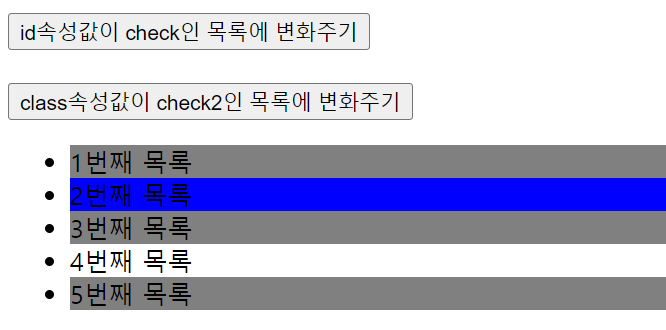
<!DOCTYPE html>
<html>
<head>
<meta charset="UTF-8">
<title>Insert title here</title>
<style type="text/css">
   li {
      margin: 10px;
      cursor: pointer;
      border: 1px solid black;
   }
   .click {
      /* 클릭 이벤트를 통해
      클래스명이 click이 된 요소가 있다면, */
      background-color: lightpink !important; -- 이 페이지에서 얘가 우선순위가 제일 높아진다.
                              와일드 카드 같이 성능이 느려질수 있어서 실무에서 많이 쓰이진 않음
    마우스를 목록에 올리면 변화가 있게 클릭을 하게 되면 우선순위를 높여서 배경색을 핑크로 바꾸기 위해
   }
</style>
</head>
<body>

   <ul>
      <li>1번째 목록</li>
      <li>2번째 목록</li>
      <li>3번째 목록</li>
      <li>4번째 목록</li>
      <li>5번째 목록</li>
   </ul>

<script type="text/javascript">
   var arr=document.querySelectorAll('li'); -- 'li'로 된것들 모두 선택해줘
   리스트를 여러개 불러와야 되서 all 사용한 상태고 그 배열에 연결 시키려고 하고 있다 .

   for(var i=0;i<arr.length;i++){
      // 이벤트를 연결할때에
      // 이벤트 리스너를 등록하는 방식으로 적용할수있다!
      -- arr[i].addEventListener('이벤트명',함수명);
      arr[i].addEventListener('mouseover',function(){
         this.style.backgroundColor='lightgray';
      마우스가 오버 이벤트가 들어오면 함수를 실행시켜줄래 ?
      });
      arr[i].addEventListener('mouseout',function(){
         this.style.backgroundColor='white'; -- 다시 원래 대로 하얀색깔로 돌아와줄래 ?
         마우스가 나가면 이 함수를 실행 시켜줄래 ?
      });

      // 함수를 바로 연결하는 방식
      // 일반적으로, 사전에 등록해둔 CSS와 연결되게끔 코드를 작성하는편
      arr[i].onclick=test;
   }

만약에 내꺼 클래스 이름이 click이면 이름 없애주고
아니라면 이름을 click으로 바꿔주세요
   function test(){
      if(this.className=='click'){
         this.className='';
      }
      else{
         this.className='click';
      }
   }

이벤트 연결할때 리스너를 사용할 수도 있고
함수를 쓸수도 있는데

기존에 연결 되었던 css와 연결

</script>

</body>
</html>[실습]
브라우저 화면에
ㅁ ㅁ
상자 2개
파랑 초록
파랑상자 클릭시
분홍상자로 변경됨
초록상자에 마우스를 올리면
동그라미로 모양 변경됨
<!DOCTYPE html>
<html>
<head>
<meta charset="UTF-8">
<title>Insert title here</title>
<style type="text/css">
#box {
	margin: 10px;
	display: inline-block;
	width: 100px;
	height: 100px;
	background-color: blue;
	cursor: pointer;
}

.box2 {
	margin: 10px;
	display: inline-block;
	width: 100px;
	height: 100px;
	background-color: green;
	cursor: pointer;
}

.click {
	margin: 10px;
	display: inline-block;
	width: 100px;
	height: 100px;
	background-color: green;
	cursor: pointer;
	border-radius: 50%;
}
</style>
</head>
<body>

	<div id="box" onmousedown="test1(this)"></div> --마우스를 누르면 test1이 this색깔로 바뀐다.
	<div class="box2"></div> -- 클래스 box2가 있다.

	<script type="text/javascript">

	function test1(obj){ -- tes1이 실행되면 pink로 바뀐다.
		obj.style.backgroundColor = 'pink';
	}


	var arr = document.getElementsByClassName('box2'); -- box2를 불러온다.
	for(var i =0; i<arr.length; i++){
	arr[i].onmouseover = test; 마우스를 올렸을때 test() 함수 실행
	arr[i].onmouseout = test; 마우스가 벗어났을때 test() 함수 실행
	}
	function test(){

	      if(this.className=='box2'){ -- box2가 되면 click으로 바꿔줘
	         this.className='click'; -- .click 이 되면 동그라미로 바뀐다.
	      }
	      else{
	         this.className='box2'; -- click 이면 box2로 바꿔서
	      }
	   } -- 껐다켰다 스위치 같은 로직
</script>


</body>
</html>강사님 풀이
<!DOCTYPE html>
<html>
<head>
<meta charset="UTF-8">
<title>실습 풀이</title>
<style type="text/css">
#wrap {
display: flex;
}
#wrap > div { 정확하게 표현하기 위해
width: 50px;
height: 50px;
margin: 10px;
cursor: pointer;
}
#a {
background-color: lightblue;
}
#b {
background-color: lightgreen;
}
.click {
border-radius: 50%;
}
</style>
</head>
<body>
큰 div 상자를 만들고
내부에 div를 둘 예정
<div id="wrap">
<!-- test1(this) -->
<div id="a" onclick="test2()"></div>
<div id="b"></div>
</div>
<script type="text/javascript">
function test1(obj){
obj.style.backgroundColor='pink';
}
function test2(){
var elem=document.getElementById('a');
elem.style.backgroundColor='red';
}
document.querySelector('#b').addEventListener('click',function(){
this.style.borderRadius='50%';
});
/*
document.querySelector('#b').onclick=test;
function test(){
// 토글 방식
if(this.className=='click'){
this.className='';
}
else{
this.className='click';
}
}
*/
</script>
</body>
</html>
<!DOCTYPE html>
<html>
<head>
<meta charset="UTF-8">
<title>Insert title here</title>
<style>
	input {
		width: 50%;
	}
	#list > li {
		margin: 5px;
	}
</style>
</head>
<body>

	<input type="text" placeholder="내용입력후 엔터">

	<ul id="list">
		<li>1번째 목록</li>
	</ul>

<script type="text/javascript">
	var obj=document.querySelector('input');
	obj.onkeydown=function(event){ 어떤 요소에게.onkeydown 했을때 함수를 부여할 예정

          --엔터를 눌렀을때 이벤트가 필요한거라
		if(event.keyCode == 13){ 만약 이벤트 키코드가 엔터니? 엔터를 입력 했을때
			var elem=document.createElement('li'); 리스트가 만들어 진다.
			목록에 요소를 추가해줘 !

			var msg=document.createTextNode(this.value); -- 이 값을 텍스트노드 생성
			elem.appendChild(msg); -- elem객체에 이 메세지 추가할거야

			어디다 붙일거냐면 ~ list 에 .appendChild (elem) 추가 할거야
			document.getElementById('list').appendChild(elem);
		}
	}
</script>

</body>
</html>
<!DOCTYPE html>
<html>
<head>
<meta charset="UTF-8">
<title>웹에서 기본제공해주는 다양한 객체 == BOM</title>
</head>
<body>

<h1>BOM : history 객체</h1>

<hr>

<a href="test10.html">다음 페이지로 이동하는 링크</a> -- 태그 만들어주기 test10.html로

</body>
</html>
<!DOCTYPE html>
<html>
<head>
<meta charset="UTF-8">
<title>결과 페이지</title>
</head>
<body>
<input type="button" value="뒤로가기 버튼"> -- 버튼타입
<script type="text/javascript">
var obj=document.querySelector('input'); -- input을 불러와서
obj.onclick=function(){ -- 클릭하면 이 함수를 실행 해주세요
history.go(-1); -- 뒤로가기 (-1) 하나 뺀다는 의미
// history.back(); -- 똑같은 뒤로가기 버튼
}
</script>
</body>
</html><!DOCTYPE html>
<html>
<head>
<meta charset="UTF-8">
<title>웹에서 기본제공해주는 다양한 객체 == BOM</title>
</head>
<body>
<h1>BOM : window 객체</h1>
<hr>
<button type="button">새 창 열기</button> -- 버튼 타입
<button type="button">창 닫기</button>
<script type="text/javascript">
var newWindow; -- 함수안에 있으면 스코프 이슈가 있다.
여러 함수에서 쓰일 때는 선언을 바깥에서 해줘야 한다.
var btnArr = document.querySelectorAll('button');
//btnArr[0].addEventListener('이벤트', 함수명);
// 첫번째 버튼에게는 이거 클릭하면 새로운 창 열어줘
btnArr[0].addEventListener('click', openWindow);
function openWindow() { -- 창을 여는 함수
newWindow = window.open(); // 팝업으로도 띄울수 있다. 팝업은 설정 해줘야 한다.
// newWindow=window.open('','팝업창','width=400,height=300');
newWindow.document.write('<h1>새로운창의 페이지</h1>');
}
btnArr[1].addEventListener('click', closeWindow);
// 두번째 버튼에게는 이거 클릭하면 창을 닫아줘 !
function closeWindow() { -- 창을 닫는 함수
정의가 안된상태 undefind
혹시 새로운 윈도우가 != 정의가 안된상태 >>> 정의가 안된상태가 아니야 ?
if (newWindow != undefined) { -- 다짜고짜 닫으려고 하면 에러가 날수도 있으므로
newWindow.close(); -- 그러면 닫아줘
}
}
</script>
</body>
</html><!DOCTYPE html>
<html>
<head>
<meta charset="UTF-8">
<title>form 요소</title>
</head>
<body>
form 과 관련된 요소 - 데이터를 전송하는 요소라서 중요하다
<form action="#" name="loginForm"> #이 본인 페이지라는 뜻 ,이름은 loginForm 이다.
<table border="1"> -- 테이블 표
<tr>
<td>아이디</td>
<td><input type="text" name="memberId" class="login" placeholder="5자이상" required></td>
</tr> required:입력 안하면 다음으로 못넘어감
<tr>
<td>비밀번호</td>
<td><input type="password" name="passwd" class="login" placeholder="10자이상" required></td>
</tr> required:입력 안하면 다음으로 못넘어감
<tr>
<td colspan="2"><input type="submit" value="데이터 전송"></td>
</tr> colspan =세로로 된 열 합치기(가로로 병합됨) ,rowspan = 가로로 된 행 합치기 (세로로 병합됨)
</table>
</form>
<script type="text/javascript">
// var elem=document.forms.loginForm;
var elem=document.forms['loginForm']; -- 로그인 폼을 만들거다
elem.onsubmit=function(){ -- 전송을 할건데 이 함수 실행해줘
if(this.memberId.value.length < 5){ // 이 이름의 값의 길이가 < 5 이니?
alert('아이디는 5자이상이어야합니다!');
this.memberId.focus(); // 멤버 아이디가 틀렸으면 포커스가 거기로 가게
return false; -- 틀렸으니 false 반환 해주고
}
if(this.passwd.value.length < 10){ -- 패스워드 값의 길이가 < 10 이니
alert('비밀번호는 10자이상이어야합니다!');
this.passwd.focus(); // 비밀번호가 틀렸으면 포커스가 거기로 가게
return false;
}
}
var arr=document.querySelectorAll('.login'); -- 클래스로 form 접근
for(var i=0;i<arr.length;i++){ -- 전체 배열에서
arr[i].onfocus=function(){ -- 포커스를 받은 경우 event 설정
this.style.backgroundColor='lightblue'; -- 입력하려고 클릭했을때 lightblue로 바뀌기
}
arr[i].onblur=function(){ -- 포커스가 해제 된 경우 event 설정
this.style.backgroundColor='white'; -- 입력 해제 됐을때 white
}
}
</script>
</body>
</html>
728x90
반응형